
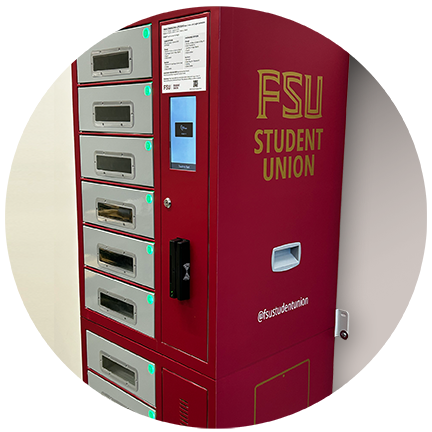
The Student Union is pleased to offer three secure RFID charging lockers for the convenience of FSU students, faculty, staff, and visitors to campus.
Locations
Charging lockers are available at the following Tallahassee campus locations:
- Student Union (Lower Level):
12-bay locker located at the base of the stairs - Student Services Building (SSB):
8-bay locker on the second floor in the lobby - Askew Student Life Center (ASLC):
8-bay locker in the lobby
Features
- Fits devices up to 14 inches
- Includes:
- AC outlets
- USB-A, USB-C, and micro USB connections, and a
- Watch charging option
- SSB and ASLC lockers also include UV-C light sanitization
How to Use
Getting Started
- Touch the screen to begin
- For lockers with UV-C the blue light indicates a 1-minute sanitizer cycle
Card Option (FSU Card or RFID Tag)
To Charge a Device
- Select an available locker (green light)
- Tap or swipe your card
- Locker will open
- Plug in your device and close the locker
To Retrieve a Device
- Tap or swipe the same card
- Locker will open
- Unplug your device
- Close the locker
Password Option
To Charge a Device
- Select an available locker (green light)
- Enter and confirm your password
- Locker will open
- Plug in your device and close the locker
To Retrieve a Device
- Enter your locker number and password
- Locker will open
- Unplug your device
- Close the locker
Assistance
For help, please call 850-644-6083 during business hours. Proof of ownership is required if access is lost.
Disclaimer
- The Student Union is not responsible for lost or stolen items.
- Items left longer than 72 hours will be transferred to the Lost & Found.
- Lockers operate offline; no user data is stored.